
Day 11: Check table structure in the Reindeer Flight Schedule
The Reindeer Flight Operations Team publishes a daily schedule showing which reindeer are flying, their cruising speed and which pilot elf is assigned. In today’s update, one column has been styled to look like a header, but is not marked up correctly.
Today, you’ll check whether table headers are defined semantically so that screen reader users can understand how the data is structured.
Your mission today
Identify the column that visually looks like a header but is not marked up as one.
Quick 5-minute check
- column headers must use
<th>, not<td> - headers must include
scope="col"orscope="row" - visual styling alone does not create structure
- screen readers rely on markup, not appearance
Review the flight schedule
One of the column “headers” below is actually marked up as a normal table cell. It also looks slightly out of place compared to the real headers.
| Reindeer | Cruising speed |
Pilot elf |
|---|---|---|
| Dasher | 900 km/h | Buddy the Elf |
| Dancer | 900 km/h | Papa Elf |
Show answer and explanation
The Pilot elf column is visually styled to look like a table
header, but it is marked up as a <td> and uses strong to make it visually stand out instead of a
<th>.
Because of this, screen readers do not treat it as a column header and do not announce it when users move through the table.
Finding this using the Web Accesibility Viewer for Elves (WAVE)
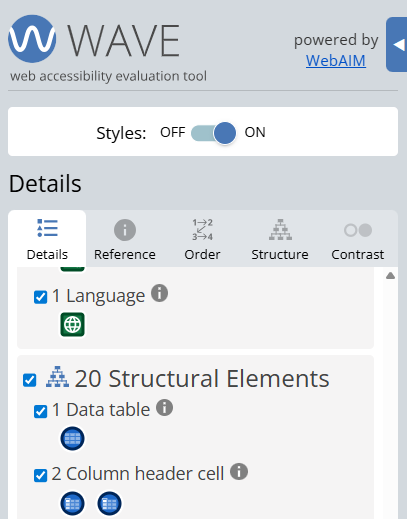
When the Web Accesibility Viewer for Elves (WAVE) is run on a page like this, it correctly detects that a data table is present.
However, because the “Pilot elf” column is marked up as a <td>
instead of a <th>, WAVE only reports 2 column headers,
even though 3 columns are visible on the page.
This is a useful clue that the visual layout and the underlying structure do not match.
Checking the markup directly
You can confirm this issue by inspecting the table markup.
- right click on the table and select Inspect
- or open your browser’s developer tools and use the inspect tool
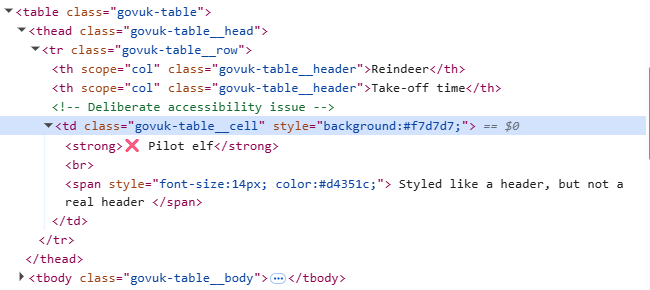
When you inspect the table headers, you’ll see that the “Pilot elf” column is
marked up as a <td> instead of a <th>.
Although it visually looks like a header because it uses <strong>,
assistive technologies do not recognise it as one.
What this checks for
1.3.1 info and relationships (opens in a new tab) – relationships in data must be conveyed programmatically, not just visually.
Why this matters
Screen reader users rely on table headers to understand how each piece of data relates to the rest of the table. If headers are missing or incorrect, the information becomes confusing or unusable.
Bonus challenge
Turn on a screen reader and move through the table by cell. Which column name is not announced?