
Day 10: Check captions on Santa’s video message
Each December, Santa records a short message for the elves using the Elf Communications Console. This year’s message has been uploaded to the dashboard, but some elves are struggling to access the information.
Today, you’ll check whether video content includes captions or an accessible alternative for people who cannot hear the audio.
Your mission today
Check whether Santa’s message includes captions or a transcript.
Quick 5-minute check
- videos with speech must have captions
- captions should include spoken words and meaningful sounds
- a transcript can be provided as an alternative
- do not rely on auto-generated captions without checking accuracy
- automated tools such as the Web Accesibility Viewer for Elves (WAVE) can help identify media, but manual checks are essential
Review Santa’s message
Below is a message from the Elf Communications Console. One accessibility issue has been deliberately introduced.
Show answer and explanation
This video contains speech but does not provide captions or a transcript. Users who cannot hear the audio cannot access the information.
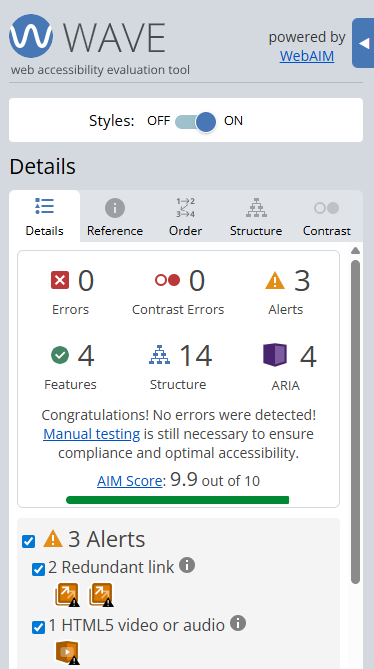
Finding this using the Web Accesibility Viewer for Elves (WAVE)
When WAVE is run on a page like this, it will flag that a video is present.
However, WAVE cannot reliably tell whether a video has accurate captions or a suitable transcript. This means you must manually check the video itself.
What this checks for
1.2.2 captions (prerecorded) (opens in a new tab) – prerecorded videos with speech must include captions or a suitable alternative.
Why this matters
Captions make video content accessible to D/deaf and hearing impaired users. They also support users in noisy environments or situations where audio cannot be played.
A note on audio description
Audio description provides spoken descriptions of important visual information for people who cannot see the video. This includes things like actions, on-screen text, or visual cues that are not explained in the dialogue.
Not every video needs audio description. If all important visual information is already communicated through speech, captions alone may be sufficient.
Bonus challenge
Mute the video or turn your sound off. How much of Santa’s message can you understand without captions?