
Day 3: Check headings in the Workshop Log
This morning, the Department of Elfish Affairs received an alert from Santa’s Workshop. The digital Workshop Log, used by elves across multiple teams, has become difficult to navigate.
Some sections look like headings but are not marked up correctly. Others jump between levels, making the page confusing for people who rely on assistive technology.
Your mission today
Check that headings follow a clear and logical structure.
Quick 5-minute check
- there should only be one
h1on a page - heading levels must not be skipped
- headings should describe the content that follows
- visual styling should not replace proper HTML headings
Examine the Workshop Log
Below is a simplified extract from the Workshop Log. One heading has been marked up incorrectly.
Toy production
The toy production team is currently working at full capacity. Several new toy designs have entered the assembly phase.
Production schedule
This week’s schedule includes extended shifts and additional quality checks. Materials are arriving later than planned.
Materials and supplies
Stock levels are stable. Replacement parts for wooden toys have been reordered and are expected to arrive by the end of the week.
Show answers and explanation for heading structure in the Workshop Log
The example above contains a heading structure issue.
-
The page starts correctly with a single
h1. -
The section heading “Toy production” is marked up as
h2, which is appropriate. -
“Production schedule” is marked up as
h4, which skips a heading level. Heading levels must not be skipped. An h4 should not follow an h2. -
The correct heading level for “Production schedule”
would be
h2as it appears the same importance as the others, orh3if it was less important. - Skipped heading levels make it harder for screen reader users to understand the structure of the page.
What this checks for
1.3.1 info and relationships (opens in a new tab) - content structure must be conveyed programmatically, not just visually.
Why this matters
Screen reader users often navigate pages using headings. If the structure is incorrect, content can feel disorganised or impossible to follow.
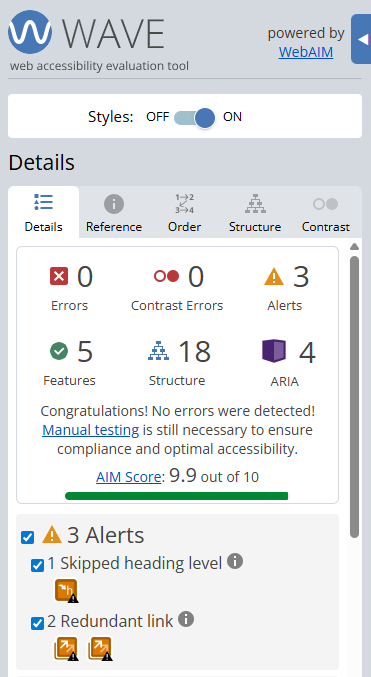
Finding this issue using the Web Accesibility Viewer for Elves (WAVE)
When WAVE is run on a page like this, it highlights heading structure issues such as skipped levels or missing headings.
WAVE can help you spot structural problems quickly, but it cannot tell you whether the heading order makes sense for users.
Bonus challenge
Use your browser’s accessibility tree or a screen reader to navigate by headings only. Does the page flow in a way that makes sense?