Day 7: Check form labels on the Elf Task Submission Form
Elves across Santa HQ submit daily updates using the Elf Task Submission Form, managed by the Department of Elfish Affairs (DEA). Recently, some elves reported difficulty completing the form using assistive technology.
Initial checks suggest that not all form fields have clear labels, making it difficult for screen reader users to understand what information is required.
Your mission today
Check that every form field has a clear, programmatic label.
Quick 5-minute check
- every input must have a visible and descriptive label
- labels should be correctly associated using
forandid - placeholder text must not be used instead of a label
- screen readers should announce the label automatically
Test the Elf Task Submission Form
This simplified example shows part of the form elves use to log their daily workshop duties. One field behaves differently when accessed using a screen reader or other assistive technology.
Show answer and explanation
Which field has the issue
The field that appears to be labelled “Festive task completed” does not have an accessible label.
What users experience
When using a screen reader, this field is announced without any meaningful
description - often as something like edit blank
or in this case its reading out the placeholder text which isn't meaningful out of context.
This makes it unclear what information the user is expected to enter.
What works correctly
The other fields on the form have clear, properly associated labels, so screen readers announce them automatically and consistently.
What this checks for
1.3.1 info and relationships (opens in a new tab) and 4.1.2 name, role, value (opens in a new tab) – form fields must expose clear labels to assistive technologies.
Why this matters
Screen reader users rely on labels to understand what information is expected. When a field has no accessible name, it becomes confusing or impossible to complete.
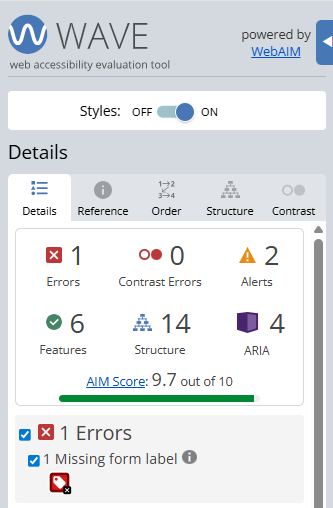
Finding this issue using the Web Accesibility Viewer for Elves (WAVE)
When WAVE is run on a page like this, it highlights form controls that are missing associated labels.
WAVE is useful for spotting missing labels quickly, but testing with a screen reader confirms how fields are actually announced to users.
Bonus challenge
Turn on a screen reader and move through the form fields. Which field is announced simply as “edit blank”, and why?